Night Shift
The Night Shift starter on GitHub
Cognitive overload
Before I started using AI tools, my usual software development life cycle looked like this:

When I got a new task from my product manager, I’d start talking to the stakeholders, looking at the designs, reading the product requirements. Then I’d think about the architecture and how this new feature could fit into our existing systems, propose a solution, discuss it with my fellow engineers, and work on the implementation. After that, I’d hand the task over to QA engineers for them to test it, and then finally ship the result.
The flow started to change at the end of 2025, when Anthropic released Opus 4.5. For me, this was the first model truly capable of doing something on its own, being more than a chat tool or a fancy auto-complete, so I started transitioning to a simple “agentic” workflow:
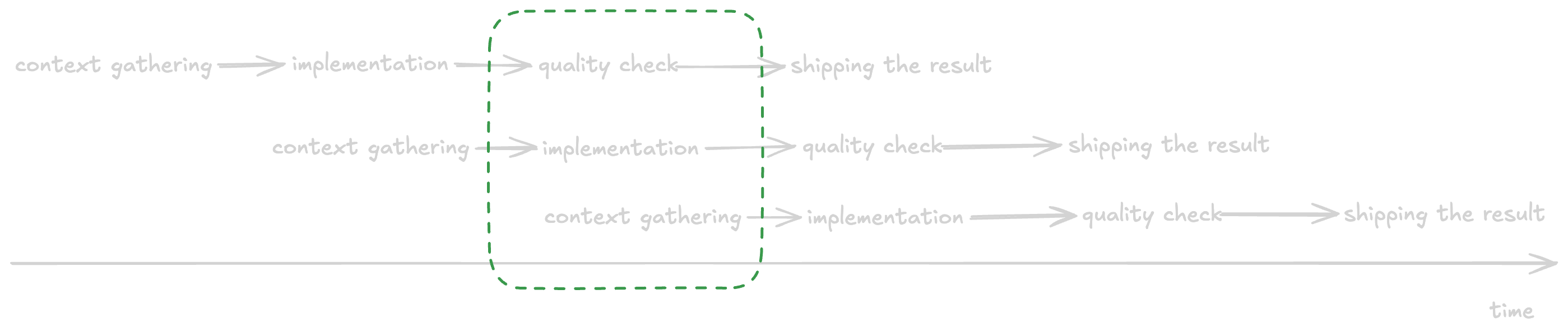
I was able to fully delegate the implementation step to an agent, so I managed to do more at the same time. I could start gathering the requirements for the next feature, while the current one was being implemented by an agent, and the previous one was being tested by a QA engineer. This improved my productivity: I started shipping more code and doing it faster. But the straightforward approach had its downsides: until you build a bulletproof agentic loop, you need to switch from your own task back to the agent to answer its questions, make adjustments and continue. This results in additional context switching, which is incredibly mentally taxing.
By the end of February 2026 I started feeling the toll of this constant switching back and forth in the form of a creeping burnout. The work was not really fun anymore: I was not doing the thing I liked (writing code), and I was constantly interrupted when I was doing the other thing I liked (gathering the requirements, coming up with architecture and system design). What if there was another way? What if there was a workflow that would allow me to focus on doing what I like to do?
Splitting the workload
In March 2026 I came across The “Night Shift” Agentic Workflow by Jamon Holmgren. I highly recommend reading the full article, but the gist of his approach is simple: during active work hours focus on doing the preparation work. Talk to colleagues, find answers, resolve roadblocks, write bulletproof specs that are ready for implementation — the stuff only you can do. Then, instead of asking an agent to start the implementation immediately, take another task and prepare it too. Repeat this until your workday is over. Right before you’re ready to log off for the evening, start an agentic loop that takes the prepared specs and implements them. It doesn’t matter if they’re done in parallel or one by one: your computer is likely idle for at least 8 hours while you sleep, so the agents can take as much time as they need.
I was very impressed with this approach, as it would allow me to reduce the interruptions, and let me focus on the part of the workflow I enjoy most.
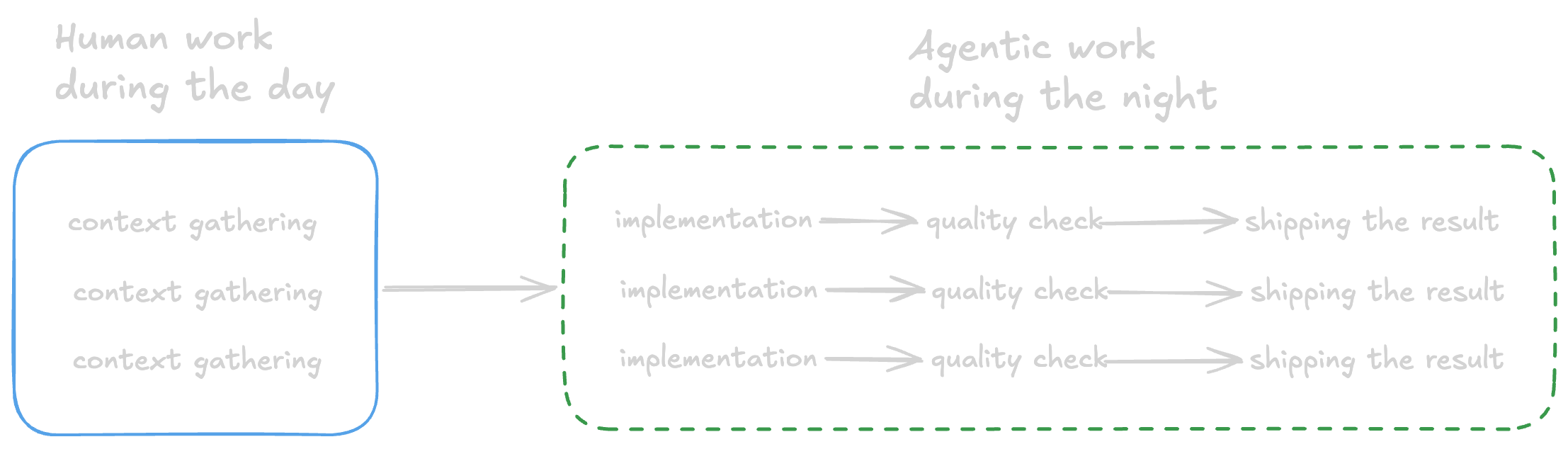
When I started implementing this workflow for my projects, I quickly came across a critical roadblock. Jamon’s article says that a robust end-to-end testing harness is vital for the success of the flow, and I didn’t have any reliable way to test the new features. Automated tests can’t verify everything reliably in a complex system spanning mobile apps, a CMS, and half a dozen backend services. While manual testing is more flexible, it’s manual. Even with my traditional SDLC, testing has always been a bottleneck, and a lot of effort has been made to shift testing left.
So the next question was: How can I include verification in my Night Shift loop?
Verifying the quality
The obvious solution is to make agents test the system. But it’s not that straightforward: agents lack the product knowledge, so they don’t understand what the expected behaviour is. The engineering team knows all of it, but this knowledge is ephemeral: the existing docs are often stale, not all of the features are documented, and the documentation lives in a variety of sources. Instead of gathering all this info manually, I’ve designed the Expedition framework. I don’t want to repeat myself (go and read the article!), but the main idea is quite simple: give an agent an app and let them explore it and document the results. Each round uses the knowledge accumulated from the previous rounds, so every Expedition goes deeper and gathers more info than the last one.
With all this knowledge gathered, we can dispatch QA agents that know how the product works and what they need to test. In the end, they produce a test report, which can be used to judge whether the feature is ready and to update the existing knowledge base. This, together with other quality gates (automated tests, linters, agentic code review), resolves the verification issue and closes the loop.
My Night Shift workflow
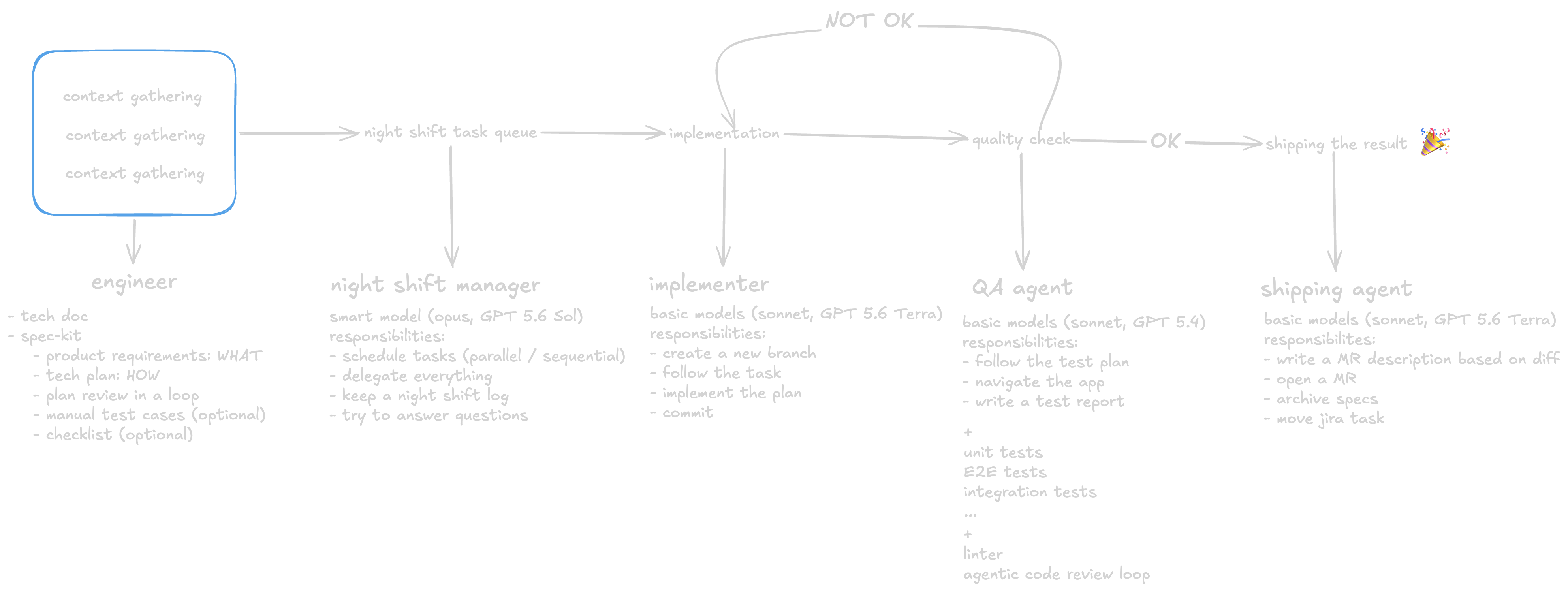
Now that we’ve got the verification working autonomously, let’s see the full flow and look at each step.
Context gathering
This is the only manual step before the Night Shift starts. I gather all the information and requirements and answer the questions that come up. I intentionally try to do as much discovery as possible upfront: this produces a clearer picture, both for me and the agents. I use spec-kit, so the outputs of this step are specs: requirements (what we want to do), a tech plan (how we’re going to do it), test cases (for when we need to dispatch a QA agent) and checklists (if the task is large and I want to have more control over the order of operations).
During my work hours I prepare as many tasks as I can, and all of them form the Night Shift task queue.
Night Shift manager
When I finish my work in the evening, I start the Night Shift routine. It spawns a Night Shift manager: a smarter model with specific instructions to take the tasks from the queue and delegate the implementation. The manager becomes an orchestrator and avoids cluttering their context with the implementation details. The manager also keeps a Night Shift log and puts all the updates and problems there. This gives me visibility into the process: I read the log in the morning and quickly get up to speed about what was done and what needs to be resolved. Lastly, the prompt for the manager includes an instruction to try to answer any questions the implementers have so the work doesn’t come to an abrupt stop. After all, it’s impossible to predict all the questions beforehand, as some of the problems can only become apparent once you start writing the code.
Implementation
The implementer is a cheaper model that reads the requirements, the plan, and then writes the code. It follows the standard protocol: create a new branch, make the necessary changes, write automated tests, make sure they are green, and commit the changes.
Quality checks
The quality checks have two parts: app verification by a QA agent and automated engineering checks.
The first part is the QA agent. It’s required for frontend changes and optional for backend changes. The QA agent is a smarter model tasked with doing the black box testing of the app. The agent has access to the specs and product knowledge. It uses tools (Argent, agent-device, Playwright) to interact with the app. The output of this step is a test report. The manager reads the report and decides whether the task can be considered completed, or if it needs additional fixes.
The second part consists of automated tests, linting, and agentic code review. The code review runs in cycles:
- Reviewers leave feedback.
- The implementer changes the code or records a response.
- Reviewers check the result.
- The cycle repeats until every comment is resolved.
Shipping the result
In this workflow, “shipping” means preparing a verified change for my review, not merging or deploying it.
Once a task is done and verified, it is ready to be shipped. The manager dispatches another agent to push the branch, write a merge request description using a template, create a merge request and do the cleanup — change the Jira ticket’s status and archive the local specs. I’ve instructed the agents to create the merge requests as drafts so I can review them before passing them to my colleagues. This ensures I can catch the issues that were missed by the agentic code review and avoid extra human review rounds.
Next morning
After all of the tasks are completed (or blocked), the Night Shift ends. I start my work the next morning by checking the Night Shift log, identifying the blockers and resolving them, doing the code review and marking the merge requests as ready. I also ask an agent to read the log in order to identify and fix any tooling or process issues the shift manager recorded. This means I don’t have to diagnose every tooling and process problem manually.
Results
I’ve used this workflow several times on batches of tasks involving a mobile app and several backend services at the same time. While I do not consider the workflow finished (I don’t think that AI workflows can be finished anyway), it still manages to produce good results. I’ve also presented it to my colleagues in the company. These observations are still qualitative; I’m currently gathering data to validate them. Here are my preliminary observations:
- The Night Shift works best when you need to implement a large new feature. This scenario allows agents to build parts independently in parallel, then test everything together.
- Conversely, not every task benefits from the workflow. Some of the tasks can be done quicker right away, without doing all of the steps.
- The workflow helped me to solve my token limit issue. Previously I often hit the limits of my subscriptions due to having many agents running in parallel: some were doing the coding, others were helping me to refine the requirements. Now this is not an issue: the implementation, testing and code review use tokens during the idle hours, when I don’t need tokens anyway, preserving the 5-hour limits I rely on during the workday.
- The loop operates even without using
/goal(a persistence harness that keeps the loop running) or similar features, but these can be added if the loop exits before processing the entire task queue. - While I observed higher productivity, I don’t want to attribute it to the workflow; instead I want to highlight the decrease in perceived cognitive load. This was my major goal, and I’m happy to report that I have fewer context switches and manage to focus on doing the things I like during my working hours.
Overall, I’m quite happy with the flow at the moment. I will continue using and refining it, as well as gathering data from other users in order to make the flow more flexible. I’m intentionally distributing it as a starter, since you can ask your favourite agent to set everything up for you and make any changes along the way.
If you’re already doing agentic development, give the Night Shift a try.