Expeditions
Agentic QA
Nowadays, I rarely write code by hand. My role, as an engineer, has shifted: I work on gathering context and feeding it into an LLM agent that writes code for me. While I still own technical design and architecture (the type of tasks I really enjoy and excel at), I still have to verify everything an agent produces. This is not a bad thing, as I’m personally responsible for the output, but if I had more robust quality gates, I could focus more on the tasks I like, instead of doing manual and tedious work.
The first thing that comes to mind is to delegate the manual QA to an agent too. I’ve tried doing that, but an agent quickly gets lost in the real app and I have to babysit and steer it, which is just another form of micromanagement and supervision. At this point I’d rather do it myself. How can we improve? Clearly, it’s a context problem. What information does an agent lack? An agent does not know anything about the product and the app, it doesn’t know preconditions, it doesn’t know how to access different parts of the product or how they fit together.
This can easily be solved by providing complete product documentation — a thing I’ve rarely seen in any company I’ve worked at. Documentation is rarely the main focus of any product company: at first sight there’s very little obvious direct value, so it gets forgotten and stale. I do have product and domain knowledge, but I absolutely do not want to spend my work time dumping my brain into markdown files: it’s just another waste of time.
So the question became: can an agent build this knowledge in the background, while I am doing something else?
I tried turning that into a framework.
Expeditions

Expeditions are my attempt at solving the product context issue. The main idea is to let agents explore the app while I’m not working and write down what they learn.
The original version had only two roles. An agent to walk the app as a black box and take notes, and another agent to turn the notes into a structured knowledge base. However, it quickly became clear that it was not enough: there are some things that are impossible to learn from interacting with the app alone. For example, how to access the debug menu? Where to get a test payment method? What feature flags exist and how to configure them? How to get past security features?
My solution was to add an escape hatch that lets me introduce new information into the framework. The agents note down the questions they have, I answer them one by one and my answers are ingested and organised back into the knowledge base.
Core loop
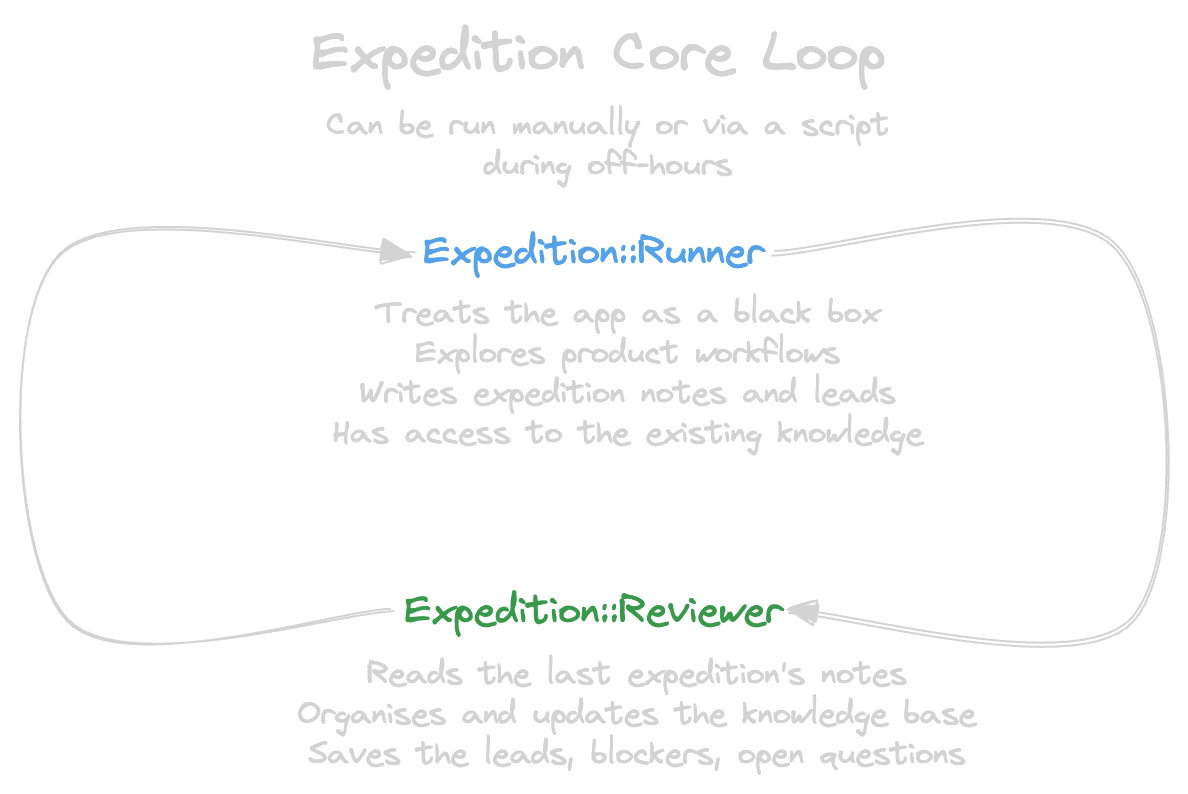
The core loop of Expedition is the part that actually grows the product knowledge base. It consists of two parts: the runner and the reviewer.
The runner behaves like a typical app user. It does not know anything about code, just taps around to understand how it works and map it. How do I make sure that the runner visits all the paths in a complex flow? Imagine you are tasked with mapping a maze. The sensible thing to do is to mark turns you have not taken, then backtrack to the nearest unexplored turn once you hit a dead-end. This is the most basic implementation of DFS. The runner marks these “turns” with leads in its notes.
Once the runner has finished, the reviewer takes over. If the runner is the explorer, the reviewer is the cartographer. It reads the field notes, folds them into the knowledge base, and reconciles the bookkeeping: open leads, closed leads, blockers, and questions the runner couldn’t answer.
When the notes are organised, another iteration can begin. I prefer running these loops via a script, using Claude’s SDK. The same can be trivially achieved with a bash script and claude -p. Be aware: the loop consumes a lot of tokens. In my personal experience, it’s better to run it during off-hours: at night, in the early morning, or on weekends — when you are not likely to need the tokens for your active tasks.
This allows you to build product knowledge incrementally, using tokens you would not have used anyway.
I let the script run the loops five times before stopping. This gives me a chance to run the interviewer to answer any questions the system has and make the next loops more productive.
Out of the loop
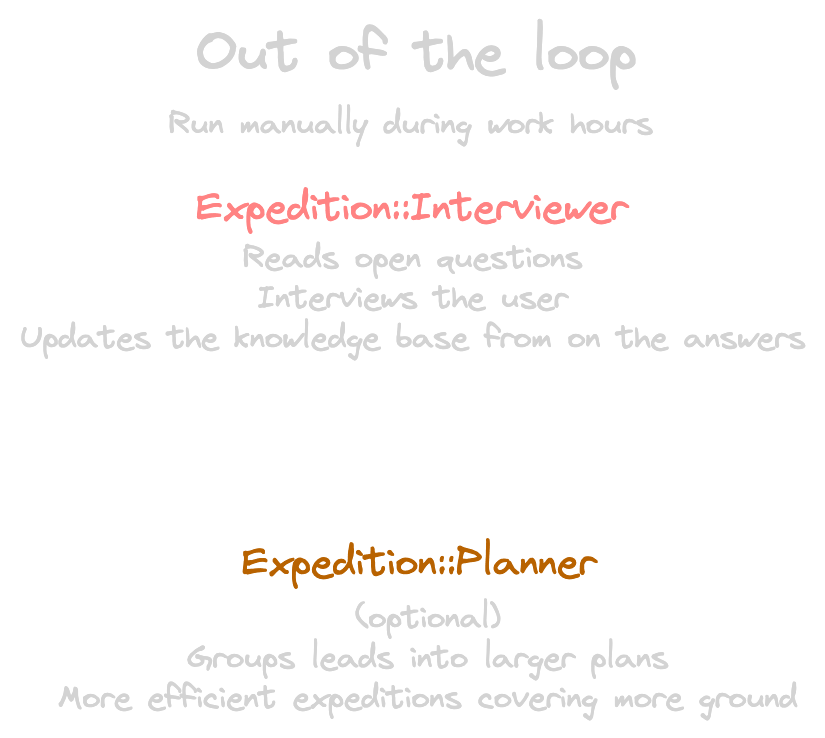
The core loop has two inherent issues: it has blind spots, and weak plans when expeditions run purely off raw leads. The blind spots are the result of an agent being able to interact only with the surfaces it sees in the app. If some feature requires additional back-end preparation (e.g. if it involves feature toggles, A/B tests, or other invisible conditions), it is practically invisible to the runner. At the same time, joining leads into a coherent Expedition plan is not a runner’s strong suit. These problems are solved by the out-of-the-loop agents: the interviewer and the planner.
The interviewer tackles the first issue. It is so far the only agent that requires an active conversation with you. It browses the open questions doc and asks you one question at a time without overwhelming you with all of the questions at once. This lets you explain changes in the app or product flow behaviour, flag run-to-run inconsistencies, and add knowledge that can’t be learned from the exploration alone.
The planner handles the second. Conversely, it is fully autonomous. Its goal is to read the open leads, gather the required context from the knowledge base and build plans that bundle as many leads as possible in a single run. In the long run this saves a lot of time, as it lets the runner “re-use” the same user to explore more leads without needing to recreate it from scratch every time. The runner, of course, is instructed to focus on plans whenever they’re available.
The answered questions fit nicely into the same knowledge base system: the interviewer organises them alongside the screens, flows and gotchas, so the next Expeditions have easy access to them. The plans are treated the same way as leads: open plans are prioritised; once a plan is explored, it’s archived.
With these two in place, both of the core loop’s weaknesses are covered. The interviewer feeds in what the runner can’t see from the outside, and the planner makes sure each run goes after as much as it can.
Consuming the knowledge
Now that we’ve run the Expeditions, burned the tokens, what do we do with the knowledge?
The original goal of running Expeditions is simple: I want agents to manually verify the work of other agents writing code. This shifts testing left and creates an additional quality gate that must be passed before the changes can be reviewed and tested by humans. However, a QA agent is useless unless it knows what to do: what should the initial state be, how to access the requested flow. Moreover, it lacks the baseline to compare the results to: what is a bug and what is the expected behaviour.
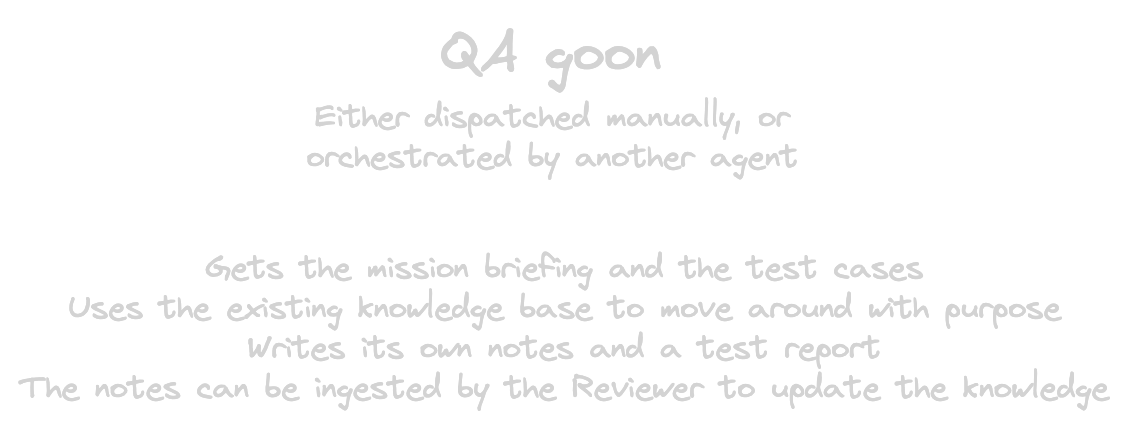
The logical next step is to introduce a new agent type: QA goon. It gets a map of the app and a set of test cases, then verifies that the changes match the requirements and haven’t caused regressions. It produces an artifact: a test report, which contains the preconditions, the steps and the observations. Sometimes the knowledge base may become outdated between runs. The QA goon flags these spots in its report, as well as any other new leads, blockers or questions it may have. The resulting test report may be ingested by the same Reviewer agent that reviews the Expedition runs. This produces a positive feedback loop: once the knowledge base has enough data, QA goon can start using it for testing and providing additional information along the way, meaning there’s no longer a need to run the core loop as often.
My Expedition starter comes with a skill called “qa-goon-briefing”. It establishes best practices and ground rules for dispatching a QA goon, and creates a test report directory. Once QA goon produces a test report, there’s another skill for debriefing: it ingests the report and updates the knowledge base with the new insights.
The QA goon closes the Expedition loop: the runner and reviewer explore and organise the data, the interviewer fills in the gaps, the planner improves the run quality, and the QA goon consumes the data to verify the quality of the app.
Future
That’s the framework as it stands today, but it’s far from finished. I intentionally created it as a starter: clone the repo, let an agent set everything up and then tweak it as you go. I’m still continuing to tweak my own setup and I’ll continue updating the repo as those changes settle.
If you are already using agents to write code, try adding a QA agent with a map of your app. In my experience, it adds a real quality gate while needing very little active focus.